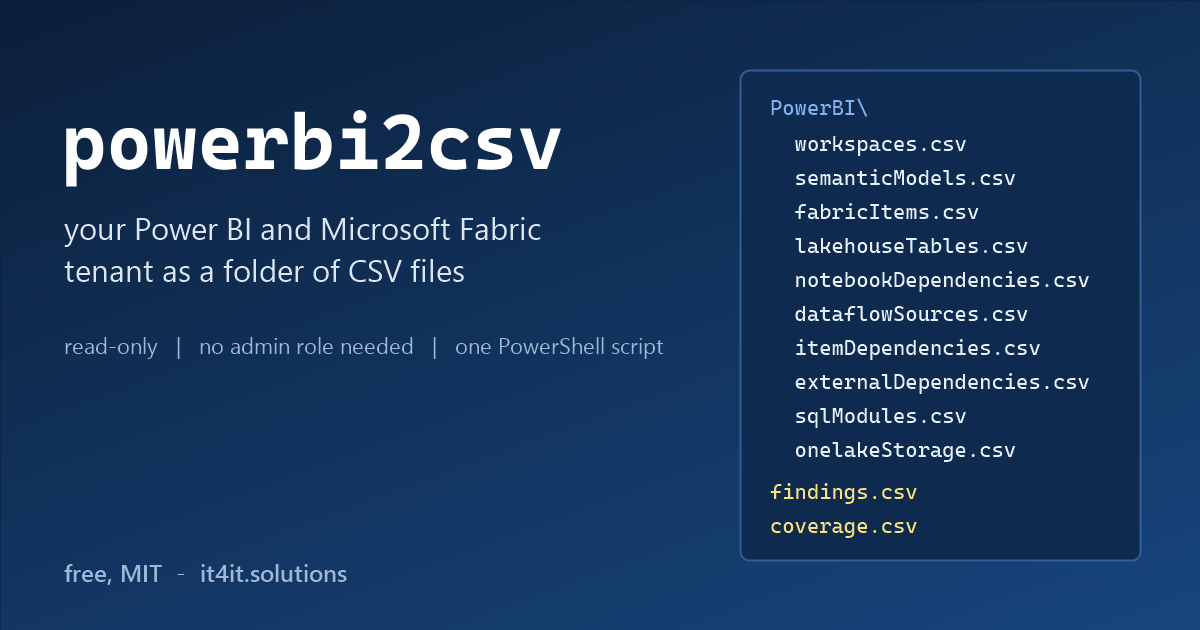
In October I published azure2csv 2.0, the Azure inventory I run before every migration. The same month a tenant-to-tenant project asked a question azure2csv cannot answer: what exactly lives in the Power BI and Microsoft Fabric half of this tenant? My answer is powerbi2csv: one PowerShell script that writes a Power BI tenant inventory to CSV files, with Fabric included. Workspaces, reports, semantic models, dataflows, lakehouses, warehouses, notebooks, pipelines, who has access to what, what depends on what, which SharePoint sites and SQL servers it all reads from, and the code behind it.
It is read-only. It needs no app registration, no secrets and no admin role: the Az sign-in of a normal workspace member is enough, and if you are a Fabric administrator it also reads the parts of the tenant you are not a member of. Free and open source (MIT), on GitHub.
Why another Power BI tenant inventory
The project had an inventory already: an Excel workbook filled in by hand by the people who built the platform. Thirty workspaces, sixty notebooks, thirty pipelines, six lakehouses, a page of semantic models. Honest work, and already out of date, because a Fabric tenant changes every week. Run as a plain member of about 30 workspaces, the script found well over 100 reports, nearly 90 semantic models, more than 200 notebooks, over 70 pipelines, some 25 lakehouses, close to 20 warehouses, about a thousand shortcuts, some 2,500 tables, views and procedures behind the SQL endpoints, and around 40 external systems the whole thing depends on. It also found a few workspaces on the hand-made list that my account could not see at all, and said so instead of silently leaving them out.
The scripts I found before writing my own were built on the MicrosoftPowerBIMgmt module and Get-PowerBIWorkspace -Scope Organization: they need the Power BI administrator role, which most BI developers do not have, and they know nothing about lakehouses, notebooks or pipelines. The commercial migration tools move content but do not tell you what you have, and their own feature lists say which object types stay manual work. I wanted the azure2csv approach instead: a folder of plain files that you can open in Excel, search, keep as a record, send to a colleague, or hand to an AI without giving it access to the tenant.
Quick start
Install-Module Az.Accounts -Scope CurrentUser
Invoke-WebRequest https://raw.githubusercontent.com/AleksandrReznik/powerbi2csv/main/powerbi2csv.ps1 -OutFile powerbi2csv.ps1
Connect-AzAccount
.\powerbi2csv.ps1
Windows PowerShell 5.1 and PowerShell 7 both work, and Az.Accounts is the only required module. The script reuses the Az sign-in you already have; it never opens the Power BI portal and it never asks for a password.
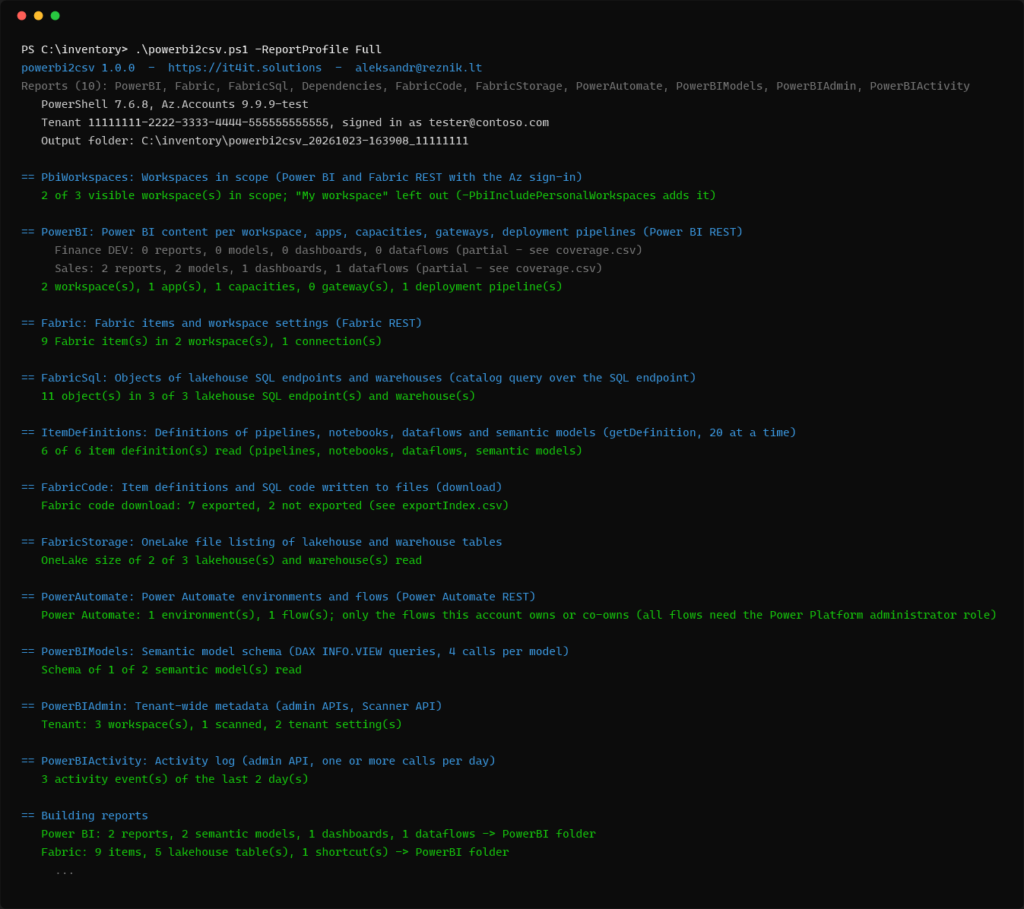
Without parameters it runs the Standard profile: Power BI content, Fabric items, the SQL endpoints, the dependency analysis and, if you have the role, the tenant-wide admin reports. On about 30 workspaces with some 600 Fabric items that took half an hour. -ReportProfile Quick reads only the Fabric item lists and takes minutes; -ReportProfile Migration adds the code download, OneLake sizes, Power Automate flows and the semantic model schema and took about an hour. -Workspace 'Finance*' and -ExcludeWorkspace '*TEST' narrow the scope, -ListReports prints the catalog.
What you get
A folder powerbi2csv_<date>_<tenant> with up to 90 CSV files (UTF-8 with BOM, every field quoted, so Excel opens them without a wizard), findings.csv, coverage.csv, a log, a machine-readable __run.json and, when the ImportExcel module is installed, one workbook with everything as sheets.
| Area | Files in PowerBI\ |
|---|---|
| Power BI | workspaces, workspaceUsers, reports, reportPages, semanticModels with data sources, users, parameters, refresh schedules and history, dashboards, dataflows with sources and transactions, lineage, apps, capacities, gateways, deployment pipelines |
| Fabric | fabricItems (every item type, with folder, tags and last run), folders, workspaceRoleAssignments, onelakeRoles, workspaceGit and gitItemStatus, workspaceNetwork, Spark settings, pools and sessions, lakehouses, lakehouseTables, warehouses, shortcuts, itemSchedules, itemRuns, connections, deployment stages and items, domains, environmentMatrix |
| SQL endpoints | sqlObjects, sqlColumns, sqlModules (the code of views and procedures), sqlReferences |
| Dependencies | pipelineActivities, notebookDependencies, dataflowSources, modelPartitions, modelExpressions, modelRoles, modelSources, itemDependencies, externalDependencies |
| Tenant-wide (administrator) | adminWorkspaces, adminItems, adminItemUsers, adminDatasourceInstances, adminModelExpressions, tenantSettings, widelyShared, activityEvents |
| Downloads | the definitions of notebooks, pipelines, dataflows and semantic models as files, the SQL of views and procedures, and with PowerBIExport the .pbix files |
| Sizes and flows | onelakeStorage, onelakeTableSizes, flowEnvironments, flows |
| Findings and coverage | findings.csv, coverage.csv |
What is in your Fabric tenant
fabricItems.csv is the list the portal does not give you: every item of every type across all workspaces, with its folder path, tags, logical ID, the number of connections, shortcuts and schedules, and the status and start time of its last run. Lakehouses come with their tables and shortcuts, warehouses with the number of tables, views and stored procedures. Lakehouses with schemas enabled have no table-list API, so the script reads their tables from the SQL endpoint instead; for every endpoint it also lists the columns, the code of every view and procedure, and the references between databases. The optional FabricStorage report adds the OneLake size of every table.
Around the items: workspace folders, role assignments and OneLake security roles, the Git connection with the number of uncommitted and incoming items, the network policy, Spark settings, custom pools and the last 200 Spark sessions per workspace, deployment pipelines with the items in every stage, and domains. environmentMatrix.csv puts the DEV, TEST, UAT and PROD workspaces of the same solution side by side, item by item, and marks what exists only in DEV. In the project that was about 200 items.
What depends on what
This is the part a hand-made inventory cannot keep up with. The script fetches the definitions of pipelines, notebooks, dataflows and semantic models, the same JSON, Python, M and TMDL that Git integration would commit, and parses them:
pipelineActivities.csv: every activity of every pipeline, including the ones nested in If and ForEach, with the notebook, dataflow, pipeline or semantic model it runs, the stored procedure and its parameters, and the activity it waits for. The “components” column of the hand-made sheet, written by the machine.notebookDependencies.csv: the lakehouses a notebook is attached to (from its metadata, exact), the tables it reads and writes, the OneLake paths, the notebooks it calls and the URLs in its code (from the code, by pattern).dataflowSources.csv: for every query of every dataflow the connector, the SharePoint site and file or the SQL server and database, and the lakehouse it writes to.modelPartitions.csv,modelExpressions.csv,modelRoles.csv,modelSources.csv: for every semantic model the storage mode per table (import, DirectQuery, Direct Lake), the DAX of every measure and calculated column, the M of every query, the row-level security roles with their filters, and the data sources.itemDependencies.csv: all of the above as one edge list. Pipeline runs notebook, notebook uses lakehouse, dataflow writes to lakehouse, report uses semantic model, semantic model reads from warehouse. Over 800 rows in the project, one pivot table away from a dependency map.
Which SharePoint sites, SQL servers and storage accounts your reports touch
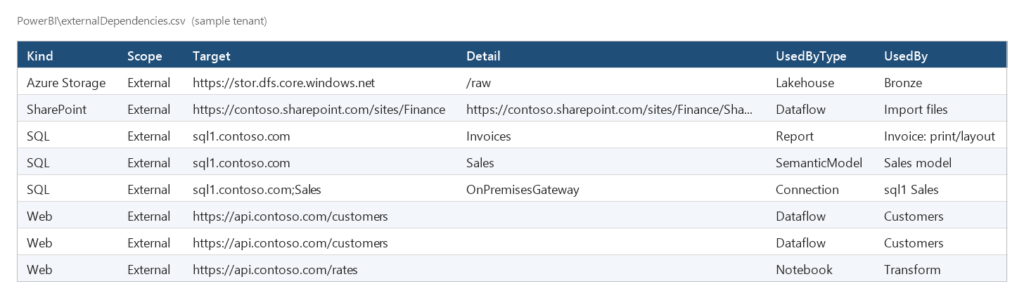
For a tenant-to-tenant migration this is the file I open first. externalDependencies.csv has one row per external target and user of it: the SharePoint site and file a dataflow reads, the SQL server behind a semantic model, the storage account behind a shortcut, the API a notebook calls, with a Kind (SharePoint, SQL, Azure Storage, Dataverse, Web, File) and a Scope that separates targets outside the tenant from Fabric addresses inside it. After a tenant move the SharePoint URLs change, the Fabric SQL endpoint addresses change, the gateways have to be recreated. This list is what somebody has to repoint, and who will notice if they do not.
Export every notebook, pipeline and semantic model as code
The FabricCode report writes what it read anyway to disk: notebook-content.py (or .ipynb with -PbiNotebookFormat Ipynb) for every notebook, pipeline-content.json for every pipeline, mashup.pq for every dataflow, the TMDL folder of every semantic model, the model.json of gen1 dataflows, and one .sql file per view and stored procedure. In the project that was about 2,600 files and 40 MB: the whole platform as text, one folder per workspace and item. You can diff it against last month, grep it for a server name, or feed it to Git integration in the target tenant. It contains no report files and no data; PowerBIExport, which you have to name explicitly, adds the .pbix and .rdl files with a size budget.
It works without the Fabric administrator role
Everything is read with the rights of the account that runs it, and a refused call never stops the run: it is counted, the workspace is marked Partial, and coverage.csv and the Problems columns of workspaces.csv say which calls were refused. As a workspace member you get the content of your workspaces; the users of a semantic model need owner-level rights, item definitions need Contributor, capacity workloads need capacity admin. As a Fabric administrator the PowerBIAdmin report adds every workspace of the tenant including personal and orphaned ones, who has access to each item, the Scanner API metadata, the tenant settings and the items published to the web or shared with the whole organisation, and PowerBIActivity adds the activity log of the last 28 days.
Because a member cannot know what they cannot see, -WorkspaceListFile takes the list of workspaces somebody expects, as .csv or .xlsx, and reports each one as found, found under a slightly different spelling, or not visible to this account. The other columns of that file, owner, purpose, “to migrate”, are carried over next to the facts.
Findings
Fourteen rules run on the collected data and land in findings.csv with a count, the affected file, a recommendation and a documentation link:
- High: semantic models whose last refresh failed; reports published to the web.
- Medium: workspaces with a single administrator; items owned by someone who is no longer a member of the workspace; pipelines and notebooks whose last run failed; items shared with a link for the whole organisation; workspaces on the expected list that this account cannot see.
- Low and info: refreshable models without an enabled schedule; models that no report uses; workspaces on a capacity without Git; items that exist only in DEV or TEST; workspaces not on a capacity; workspaces that were read only partly; the list of external targets.
How I use it in a tenant-to-tenant migration
A Power BI tenant inventory is the first week of every tenant-to-tenant project. This is how I spend it now:
- Run
.\powerbi2csv.ps1 -ReportProfile Migration -WorkspaceListFile .\scope.xlsx -Zipwith the most senior account you can get: a Fabric administrator, or at least a member of every workspace in scope. workspacePlan.csvand finding PBI-11: close the gap between the workspaces people think exist and the ones the account can see, before counting anything else.externalDependencies.csv: the repointing list. Group by Kind and Target; every SharePoint site, SQL server and gateway in it needs an owner in the target tenant.itemDependencies.csvandpipelineActivities.csv: the order of rebuilding. Lakehouses and warehouses first, then dataflows and notebooks, then pipelines, then semantic models, then reports and apps.environmentMatrix.csvand finding PBI-14: what stays behind. DEV leftovers are the cheapest part of a migration to drop.- The
FabricCodefolder: the source for Git-based deployment into the target tenant, and the place to search for hard-coded workspace IDs and connection strings. findings.csv: fix failed refreshes, failed runs and orphaned owners before the move. They do not get better by moving.- Then, as with azure2csv, hand the CSV folder to an AI and let it draft the plan. The AI sees files, not the tenant.
The commercial migration tools move workspaces, reports and semantic models; by their own documentation, dataflows, apps, paginated reports and gateways are manual work. The inventory tells you how many of each you have, and the code download gives you the definitions to recreate them.
How it relates to azure2csv
powerbi2csv has the same ten regions, the same report catalog and the same helper functions as azure2csv, and its files are named PowerBI\... so that they land next to the ADO\ folder. The Power BI blocks will be merged into azure2csv as a feature; the standalone script stays for the many Power BI people who have no Azure subscription rights and do not need the other 60 reports.
Limits
- Notebook dependencies come from pattern matching on the code: a table name built at run time appears as written, and a table read through a variable is missed. The attached lakehouses are exact.
- The DAX
INFO.VIEWqueries of thePowerBIModelsreport return names and types, but the service leaves the expressions empty; the DAX comes from the model definition instead, which needs Contributor on the workspace. - OneLake sizes include old Delta versions that were not vacuumed yet.
- Power Automate shows only the flows the account owns or co-owns, unless it is a Power Platform administrator.
environmentMatrix.csvrelies on workspaces named “solution – DEV / TEST / UAT / PROD” and on item names that do not change between environments.- The per-item Git status needs the account’s Git credentials for the repository. Environments, eventhouses, mirrored and SQL databases were not present in the tenant this was built against: they are listed and downloaded, their extra properties are untested.
- Capacity usage has no REST API; tenant-wide tags and sensitivity labels need the administrator role.
Safety: what it reads
GET requests to the Power BI, Fabric, OneLake (file listing only) and Power Automate REST APIs; three POST requests that read (executeQueries for the DAX INFO queries, getDefinition for item definitions, the admin getInfo scan); and, for the SQL endpoints, four SELECTs on the system catalog (sys.objects, INFORMATION_SCHEMA.COLUMNS, sys.sql_modules, sys.sql_expression_dependencies), never on a user table. Nothing is created, changed or deleted. The output contains names, e-mail addresses, connection details, SQL and DAX, with FabricCode the source of notebooks (which can hold a password somebody typed into a cell), and with PowerBIExport data. Treat the run folder like a backup of the tenant.
Disclaimer
powerbi2csv is experimental and provided as is, without warranty of any kind, under the MIT license. I take no responsibility for the results or for decisions based on them. Every finding, status and count is a suggestion to verify against the portal and Microsoft’s documentation.
Download
GitHub: github.com/AleksandrReznik/powerbi2csv, with the Power BI tenant inventory script itself, the offline tests, the changelog and a complete sample run of a fictional tenant in docs/sample. If an item type or a column is missing, open an issue with what the API returns for it (names masked).
Need help with a Power BI or Fabric migration?
I do tenant-to-tenant moves after mergers and divestments, Fabric clean-ups, and the Azure side of the same projects. If you have one coming: run the script, send me coverage.csv and findings.csv (they contain workspace names and statuses, no data), and I will tell you what your migration involves and roughly how long it takes. aleksandr@reznik.lt